TL;DR
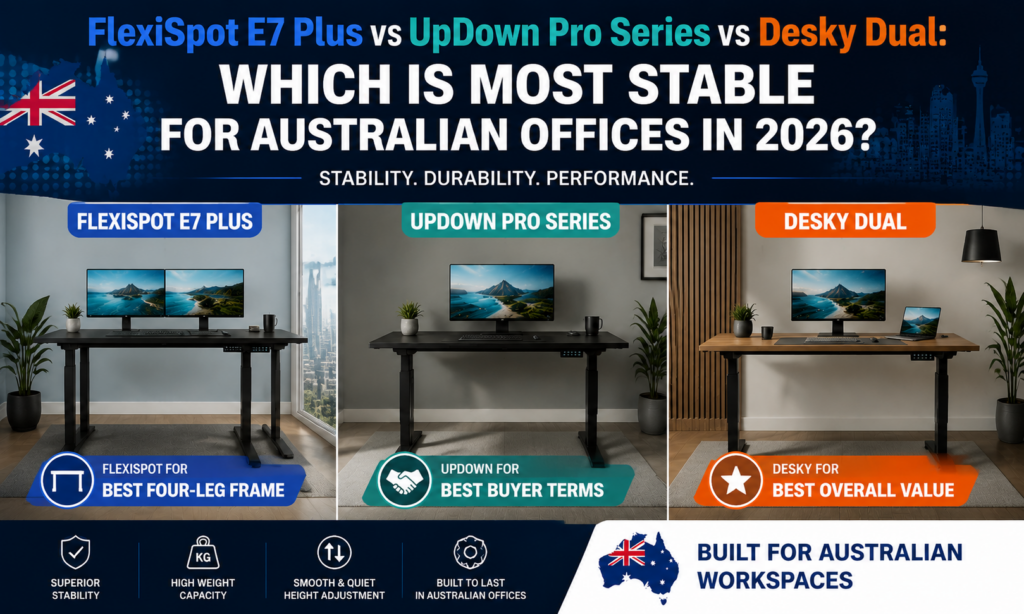
- Best for a Four-Leg Frame: FlexiSpot E7 Plus: the only genuine four-leg frame in this comparison, built for rigidity under heavy multi-monitor loads.
- Best Buyer Terms: UpDown Pro Series: a 100-day money-back trial lets you test it in your own office before committing.
- Best Overall Value: Desky Dual: a 150kg dual-motor frame, integrated cable management, and a 10-year warranty at a melamine entry price.
- The bottom line: stability comes down to more than one spec, motor synchronisation and desktop bracing matter alongside the frame, so weigh the full design before assuming the priciest option is the steadiest.
FlexiSpot’s E7 Plus beats both rivals on raw structural stability, because it is the only desk of the three built on a genuine four-leg frame rather than the usual two-leg telescoping column. That extra pair of legs matters most under real Australian office conditions: dual monitors, a monitor arm, a docking station, and the kind of desktop load that turns a marginal frame into a daily irritation. UpDown’s Pro Series answers with the strongest buyer protection of the three, a 100-day trial that removes the risk of choosing wrong. Desky’s Dual frame rounds out the field with the most complete spec sheet for the price, from cable management to warranty length.
A wobbly desk costs an Australian office more than the price difference between these three models suggests. Teams that lean on a desk during video calls, or load it with a monitor arm and a laptop dock, feel the frame weaken within weeks, not years, and workplace ergonomics guidance in Australia treats a stable, adjustable desk as part of a properly set up workstation [4]. This comparison uses the same monitors, arms, load, floor, and height settings across all three desks, so any differences below are due to the frames themselves.
For the record, this comparison carries no affiliation with any brand named here, no affiliate links, and no commission on anything you buy. Every claim below traces back to a published spec sheet or a verified source, not a sponsorship arrangement.
How We Compared These Three Desks
Every measure below assumes the same setup: two 27-inch monitors on a dual-monitor arm, a keyboard, mouse, and laptop dock, hard flooring, and a height range for an office worker between roughly 165cm and 185cm.
- Lateral movement: side-to-side sway at the desktop edge, driven mostly by leg count and leg-stage rigidity.
- Front-to-back movement: forward-backward flex under load, the movement most people notice while typing.
- Lift speed under load: how close the desk holds to its stated mm/second figure while carrying two monitors and a dock.
- Desktop depth: surface behind the keyboard for a monitor arm base and dock cabling.
- Motor noise: audible hum during a height change.
- Warranty, assembly, and delivered price: what happens after the sale.
This comparison lacks independent, apples-to-apples wobble data for these three models tested side by side under identical load, since no lab has published one. Where a manufacturer publishes a verified figure, this comparison uses that number directly; where stability depends on frame architecture, it compares the structural design itself. Furntech’s AFRDI certification programme is the closest Australian benchmark for furniture structural durability, an independent standard some Australian desk brands carry [5].
The Three Desks, Compared in Detail
|
Spec |
FlexiSpot E7 Plus (4-Leg) |
UpDown Pro Series |
Desky Dual |
|
Award |
Best for a Four-Leg Frame |
Best Buyer Terms |
Best Overall Value |
|
Frame / Motors |
4-leg, dual motor, 3-stage |
2-leg, dual motor |
2-leg, dual motor |
|
Weight Capacity |
245kg |
150kg |
150kg |
|
Height Range |
66–131cm |
64–129cm |
60–125cm |
|
Lift Speed |
Not published |
40mm/sec |
40mm/sec |
|
Desktop Depth |
76cm |
75cm |
75cm |
|
Noise |
Not published |
Under 40dB |
Under 40dB |
|
Warranty |
15-year warranty |
10yr frame, 5yr desktop |
10yr frame/motor/electronics, 5yr desktop |
|
Price From (AUD) |
$629.99 |
$899 |
$825 |
FlexiSpot E7 Plus (4-Leg) – Best for a Four-Leg Frame
FlexiSpot’s E7 Plus swaps the usual two-leg telescoping column for four independent legs on a synchronised dual-motor system. That fourth-floor contact point removes the diagonal sway that a two-leg desk shows under an off-centre load, such as a monitor arm mounted to one side. An independent reviewer testing the desk under full load reported it “didn’t budge a smidge” at maximum height [1].
The frame carries a 245kg static weight capacity, well above either rival, and runs on three-stage telescoping legs across a 66–131cm height range. Assembly involves extra hardware for the additional legs, so it takes somewhat longer than a standard two-leg frame, a direct trade-off for the added rigidity, and the frame is backed by a 15-year warranty, the longest of the three compared here [1].
Key highlights:
- Four-leg architecture removes lateral sway that two-leg frames can’t fully eliminate
- 245kg weight capacity, the highest of the three desks compared here
- 15-year warranty, the longest coverage of the three
- Free shipping Australia-wide, with a delivered price of $629.99, the lowest of the three
Considerations:
- No published lift speed or noise-level figures for direct comparison
- Not compatible with under-desk drawer accessories
- Assembly takes longer than a standard two-leg frame because of the extra hardware
- No trial or extended return period, unlike UpDown’s 100-day window
Recommended for: Australian offices running heavy multi-monitor setups, docking stations, or precision equipment where floor-level rigidity outweighs warranty length.
Contact FlexiSpot:
Address: Suite 302, 432 St Kilda Road, Melbourne VIC 3004
Phone: +61 3 6161 3555
Facebook: facebook.com/FlexiSpotAU
UpDown Pro Series – Best Buyer Terms
UpDown’s Pro Series backs a standard two-leg, dual-motor frame with a 100-day money-back trial, the longest return window of the three brands compared here [2]. Buyers can install the desk, use it for over three months, and send it back for a refund, store credit, or exchange if it doesn’t suit the space, though return shipping and the original delivery fee are the buyer’s responsibility.
The frame lifts 150kg at 40mm per second, with an independent reviewer describing the motors as quiet enough for early-morning use [2]. Height runs 64–129cm across a melamine desktop line priced from $899, with a $49.90 flat delivery fee.
Key highlights:
- 100-day trial removes the risk of buying the wrong desk
- 150kg capacity and 40mm/sec lift speed match Desky’s Dual on paper
- 10-year frame warranty plus 5-year desktop coverage
- Local AU showroom and support based in Dandenong South, VIC
Considerations:
- Standard two-leg frame, so it lacks the four-leg rigidity of the FlexiSpot
- Buyer covers return shipping if the 100-day trial is used
- Regular price sits above both rivals before any sale pricing
- The Klik variant (not reviewed here) is a step down in stability and finish from the Pro+
Recommended for: First-time standing desk buyers who want a genuine safety net, and anyone unsure whether a given height range or footprint will suit their space.
Contact UpDown:
Address: 128-130 South Park Drive, Dandenong South VIC 3175
Phone: 1300 650 773
Facebook: facebook.com/p/UpDown-Desks-Australia-100063594094032/
Desky Dual – Best Overall Value
Desky’s Dual Standing Desk pairs a 150kg dual-motor frame with cable management engineered into the frame itself, not bolted on as an accessory. The Integrated Cable & Data Channel runs the length of the desk, routing power and data cables under the desktop so a two-monitor, docked setup stays free of trailing cords, and an independent reviewer rated its 40dB noise level among the quietest available for an electric standing desk [3].
Desky’s Dual delivers a 40mm-per-second lift speed across a 60–125cm height range on three-stage telescoping legs, and carries a 10-year warranty across the frame, motors, and electronics, with 5 years on the desktop surface. App and Siri voice control comes standard, with four saved height presets, sit/stand reminders, and usage tracking built into the companion app rather than sold as an add-on.
Desktop options span melamine from $825 through to bamboo, softwood, rubberwood, and hardwood from $1,299, across four size options up to 2000 x 750mm and four frame colours (Matte Black, White, Grey, Space Grey). The frame carries BIFMA, EESS, and TÜV Rheinland certification alongside AFRDI, the Australian furniture testing benchmark referenced earlier in this comparison [5].
Shipping is flat $39.95 Australia-wide, with same-day dispatch for orders placed before 12pm AEST.
https://www.youtube.com/watch?v=2GcnBUnyEQY
Key highlights:
- 150kg capacity and 40mm/sec lift speed on par with UpDown’s Pro Series
- Cable management engineered into the frame rather than a separate tray
- 10-year warranty across frame, motors, and electronics
- App and Siri voice control with saved height presets, sit/stand reminders, and usage tracking
- Four frame colours and desktop materials spanning melamine through to hardwood, in sizes up to 2000 x 750mm
- AFRDI, BIFMA, EESS, and TÜV Rheinland certified
Considerations:
- Two-leg frame, so it doesn’t match the FlexiSpot’s four-leg rigidity under an off-centre load
- No trial period comparable to UpDown’s 100 days
- Premium hardwood desktops push the price well above the melamine entry point
Recommended for: Buyers who want the strongest combination of warranty, cable management, and frame performance without paying for a four-leg upgrade or giving up a low price.
Contact Desky:
Address: 2620 Ipswich Road, Darra QLD 4076 (click and collect); showroom at 865 Stanley St, Woolloongabba QLD 4102
Phone: (07) 3088 9131
Instagram: instagram.com/deskyau
Practical Tips for a More Stable Standing Desk
Frame architecture sets the ceiling for stability, but setup decisions determine how much of it you actually keep day-to-day on any of these three desks.
- Check the floor before blaming the frame: an uneven surface or a worn levelling foot causes wobble that has nothing to do with leg count. Level the desk properly before judging its frame.
- Mount monitor arms centrally, not off to one side: an off-centre arm concentrates weight on one edge of the desktop, the exact load that exposes a two-leg frame’s weaker point.
- Retighten the crossbar and leg bolts after the first few weeks: normal use loosens the hardware slightly during break-in, and a five-minute check restores rigidity to any frame.
- Route cables through the frame’s channel, not across the desktop: a loose cable snagging on a chair or keyboard rocks a desk more than the frame itself does.
- Test stability at your actual working height: most desks feel steadiest at the extremes of their range, so check the mid-range height you’ll use daily, where sway is easiest to notice.
None of these change which frame is inherently more rigid, but they decide how much of that rigidity you keep once the desk is set up.
FAQs
Is a four-leg standing desk actually more stable than a two-leg desk?
Yes, a four-leg frame adds a second pair of floor contact points, reducing the diagonal sway a two-leg column shows under an off-centre load like a monitor arm. The trade-off here is a longer assembly time, not a shorter warranty, since FlexiSpot’s four-leg frame carries the longest coverage of the three.
What happens if I don’t like a standing desk after buying it?
UpDown’s Pro Series pairs its purchase with the only formal trial of the three, a 100-day window allowing a refund, store credit, or exchange. The buyer covers return shipping, and the original delivery fee is non-refundable.
Does a higher weight capacity mean a more stable desk?
Weight capacity alone doesn’t guarantee a more stable desk. Capacity measures how much load the motors lift safely, while stability depends more on leg count and leg-stage rigidity.
Why doesn’t Desky’s Dual include a trial period like UpDown’s?
Desky backs the Dual with a 10-year warranty across the frame, motors, and electronics instead of a return window, betting on long-term reliability over a short-term safety net.
Which of these three desks ships fastest and cheapest in Australia?
Desky and FlexiSpot both offer flat or free shipping Australia-wide, with Desky adding same-day dispatch before 12pm AEST. UpDown charges a $49.90 flat delivery fee on top of its desk pricing.
The Bottom Line
FlexiSpot’s E7 Plus delivers the strongest structural stability of the three, built on a four-leg frame and backed by the longest warranty on this list at 15 years. UpDown’s Pro Series answers with the safest buying decision, a 100-day trial that removes the guesswork before you commit. Desky’s Dual rounds out the field with the strongest all-round spec sheet at a melamine entry price, pairing a 150kg frame with cable management engineered into the frame itself.
The right call depends on which trade-off your office can least afford to get wrong: unmatched frame rigidity, a risk-free way to test the purchase first, or the broadest spread of features for the money. Weigh that priority against your own setup, not the headline award, before committing to any of the three.
References:
-
Tom’s Guide. (2026). I’ve been testing this standing desk, and I can’t believe how sturdy and customizable it is (FlexiSpot E7 Plus review). https://www.tomsguide.com/home/home-office/flexispot-e7-plus-review
-
Best Standing Desks (AU). (2026). UpDown PRO+ Standing Desk Review: What We Liked & What We Didn’t. https://beststandingdesks.com.au/updown-pro-series-standing-desk-review/
-
Best Standing Desks (AU). (2026). Desky Dual Standing Desk Review. https://beststandingdesks.com.au/desky-review/
-
Safe Work Australia. (2023). Sitting and Standing. https://www.safeworkaustralia.gov.au/safety-topic/hazards/sitting-and-standing
-
Furntech AFRDI. (2024). Australasian Furnishing Research and Development Institute. https://www.furntech.org.au/